Skip to Content
  • +1 720-466-8586
Drone Sports, Inc.
  • 0
  • Sign in
  • Our Programs
    • U.S. Drone Soccer
  • Companion Gear
  • Info Request
  • My Account
  • Contact us
  • Articles
Drone Sports, Inc.
  • 0
    • Our Programs
      • U.S. Drone Soccer
    • Companion Gear
    • Info Request
    • My Account
    • Contact us
    • Articles
  • +1 720-466-8586
  • Sign in

Welcome!

This community is for educators, drone enthusiasts, and professionals passionate about our products and services. Share and discuss top content and innovative ideas, enhance your skills, and connect with others in the field to become a better drone expert together.  

Hide Intro Register
You need to be registered to interact with the community.
All Posts People Badges
Tags (View all)
Hardware
About this forum
You need to be registered to interact with the community.
All Posts People Badges
Tags (View all)
Hardware
About this forum
Help with Saker Products

Saker Bantam AIO Flight Controller Capacitor too large?

Subscribe

Get notified when there's activity on this post

This question has been flagged
Hardware
1 Reply
1729 Views
Avatar
William Aumer

Hello Drone Sports Community,

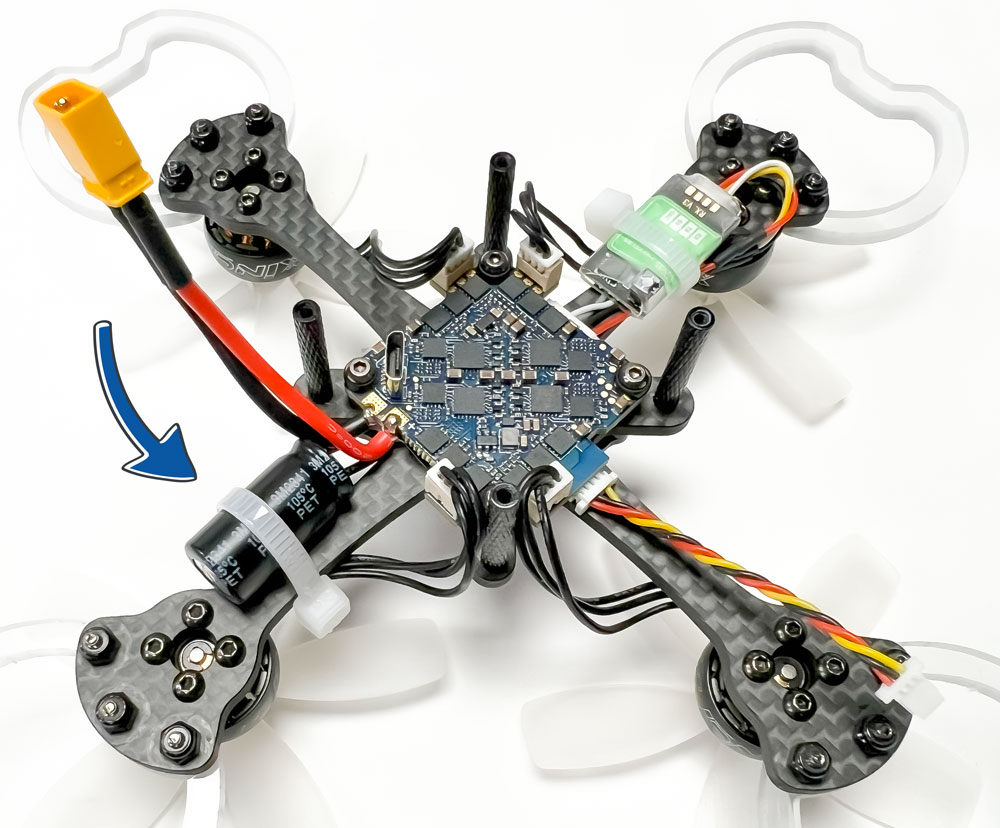
We’re excited to launch our new forum, a space where you can share experiences, tips, and solutions related to your drone technology. To kick things off, we’d like to address a common issue some of you might be facing: securing oversized capacitors on your drone's AIO flight controller.

Why It Matters:

For those with larger capacitors, ensuring they are securely attached is crucial to maintaining optimal performance and preventing potential damage during flights. While not all our products come with oversized capacitors, some customers might experience this.
0
Avatar
Discard
Avatar
William Aumer
Author

Recommended Solution:

A simple and effective solution is to use a cable tie to secure the capacitor in place. Here’s a quick guide on how to do it:

  1. Identify the Capacitor: Locate the oversized capacitor on your AIO flight controller. It’s usually cylindrical and connected to the power distribution board.
  2. Position the Cable Tie: Wrap a cable tie around the capacitor and the frame of the drone. Ensure it’s positioned in a way that doesn’t interfere with other components or wiring.
  3. Tighten Securely: Gently tighten the cable tie until the capacitor is held firmly in place. Be careful not to overtighten, as this might damage the capacitor.
  4. Trim Excess: Cut off any excess length of the cable tie for a neat and professional finish.

By following these steps, you can help ensure that your drone’s components remain secure and functional during flight.

We hope you find this tip helpful! If you have any questions or additional tips, feel free to share them in this thread. Thank you for being a part of the Drone Sports community.

0
Avatar
Discard
Enjoying the discussion? Don't just read, join in!

Create an account today to enjoy exclusive features and engage with our awesome community!

Sign up

  • Home
  • About us
  • Products
  • Services
  • Legal
  • Contact us

As pioneers in the drone sports industry, we started with a unique vision: to offer world-class equipment to drone soccer aviators, and in doing so, create enriching, skill building aviation/aerospace career pathways for underserved students.

Connect with us
  • Contact us
  • info@dronesports.us
  • +1 720-466-8586
Follow us
Copyright © 2024 Drone Sports, Inc.